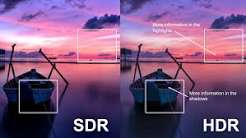

You’ve seen the demo. A sunset blazes across the screen, sparks fly off a blade and the dark corners of a cave still show detail. Then you buy a screen with an HDR badge and the picture looks dim and washed out. What happened? HDR DRAGON222 can look spectacular, but it’s also one of the most confusing features in modern displays. The badge on the box doesn’t guarantee a good experience, and settings can make or break the result. This guide explains what high dynamic range actually does, what you need to enjoy it and whether it’s worth chasing at all.
What HDR means
Dynamic range is the difference between the darkest and brightest parts of a picture. A standard display has a limited range, so very bright and very dark details get squashed. HDR widens that range, allowing brighter highlights and deeper shadows in the same scene.
It also supports a wider range of colours, which makes some scenes look richer and more natural.
What it looks like when it works
In a good implementation, the difference is striking. Sunlight feels genuinely bright, neon signs glow, fire flickers with warmth and dark scenes keep detail in the shadows. The picture feels deeper and more lifelike, instead of just sharper.
The best results appear in games designed for HDR, with carefully tuned lighting. In those games, it can transform the atmosphere.
Why many HDR monitors disappoint
The word HDR on a monitor can mean very different things. Some cheap screens accept an HDR signal but can’t produce the brightness or contrast to display it properly. The result is a flat, dull picture that looks worse than standard mode.
- Low peak brightness means highlights don’t stand out
- Poor contrast means blacks look grey
- Few dimming zones mean bright areas bleed into dark ones
- Weak colour range limits the improvement
A truly good HDR screen needs strong hardware, and that costs money.
What to look for
When shopping, look beyond the badge. Check independent reviews that measure brightness and contrast. Screens with local dimming or self-lit pixels, such as OLED, tend to deliver the best results. Pay attention to peak brightness and how well the screen handles dark scenes.
Don’t rely on marketing labels alone. Real tests tell you far more.
Software and settings
HDR needs everything in the chain to work together. Your graphics hardware, cable, operating system, game and display must all support it. Turn it on in the system settings, then in the game, and use the game’s calibration tool if it has one.
If the picture looks washed out, the fault may lie with a setting. Check that the display is in the right mode, and adjust the game’s brightness options.
Some games ask you to adjust sliders until a logo just disappears into the background. Don’t skip this step. It tells the game how bright your display can go and prevents highlights from clipping into plain white. Ten minutes of careful adjustment can be the difference between a stunning picture and a dull one.
Desktop use
On a computer, HDR can make ordinary desktop use look odd. Colours may appear dull, and text can look off. Many people turn HDR on for games and off for everything else. Newer systems handle this better, but it’s worth checking.
Is it worth it for competitive games?
Rarely. Competitive players usually prefer clear, consistent pictures and low delay, and HDR can add processing time. In fast shooters, the extra realism isn’t worth the trade. For cinematic adventures and slower games, however, it can add a lot.
Making a decision
- Think about which games you play most.
- Decide whether atmosphere or speed matters more.
- Set a budget that can afford a good HDR screen, not a cheap one.
- Read reviews that test real HDR performance.
- If your budget is tight, spend it on a good standard display instead.
A great standard picture beats a poor HDR one every time.
Think about the room as well. HDR shines in dim spaces, where bright highlights and deep shadows stand out. In a bright room with sunlight on the screen, the benefit shrinks, and reflections can spoil the effect. Closing the curtains for a story game isn’t just atmosphere, it genuinely helps the picture. Matching the room to the display is a free upgrade that many players overlook.
Frequently asked questions
Is HDR gaming worth it?
For visually rich single-player slot on a good screen, yes. On a weak HDR monitor or for competitive play, it often isn’t.
Why does HDR look washed out on my monitor?
It could be a limited display or incorrect settings. Check calibration options and your screen’s actual capabilities.
Do I need a special cable for HDR?
Often you need a cable and port that support the required bandwidth. Check your display and graphics hardware specifications.
The short version
HDR gaming rewards good hardware and careful setup. Choose a quality display, calibrate it properly and save it for games that benefit. A cheap HDR badge is no substitute for a good picture.